home page

LUSIFER MODCHIP
FORUM
ASK ANYTHING U LIKE!
>> installation >> V5-V6 consoles

_ Lusifer modchip  
_ Installation
_ Swap tricks
_ PS2 models
_ PS2 repair
_ Spare Parts_
_ Mods research
-- Mods comparison
--> order info
_ L-mod price list  
_ shipment  
_ shoping cart  
--> company info
_ about us  
_ conatct us  
--> mailing list

- name :
- email
:

--> mods pictures
-- Lusifer Research  
-- GRmods factory  
-- Available stock  
-- Lusifer 2nd Edition  

designed by @.t.n.s


V5 - v6 consoles:
8 screws + extra screw

Lusifer full diagrams

Soldering is for research...


--------

--General info

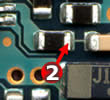
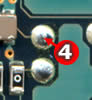
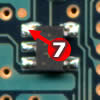
- Use pin2, pin4, pin7 points, from the existing neo2.2 diagrams.
- Avoid pinx (pin5-6 difficult points and pin1-3-8 rutine points)
from the existing neo2.2 diagrams.
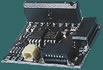
The operation of these points is included in Lusifer modchips.
- Avoid capacitor in pin2, that neo2.2 needed.
The proper capacitor is included in Lusifer mainboard.

- Quick tips

We strongly recomend you, to avoid soldering, for the following reasons:

- Soldering is adding to your console the ability of DVD-Rips booting,
for low cost backups, but most commonly,
this type of backups is not compatible with PS2 system,
and may tune off your Laser Adjustment.
- Sometimes, soldering may cause unexpected damage in your PS2,
like the straight tuning off your Laser Adjustment.
- Wrong soldering may damage your mainboard.


1st Generation consoles

2nd generation consoles

models scph-3xxxx

models scph-3xxxxR
no extra screw

models scph-3xxxxR
extra screw in th expansion bay

10 screws

8 screws

normal connectors

reversed connectors

V2-V3 V4 V4R V5 V6 V6R

For these versions, use G1-Plug In

For these versions, use G2-Plug In

Lusifer mod installation

Lusifer mod installation

Lusifer mod installation

Lusifer mod installation

Lusifer full diagrams

Lusifer full diagrams

Lusifer full diagrams

Lusifer full diagrams

photos

photos

photos

Lusifer mod soldering installation for Future PS2 versions


.
 
..
 

1. Insert your model (SCPH-xxxxx)
2. Select your system (PAL-NTSC)
3. Insert your serial (f.e. c256731)
4. Select your version